

Java applications are known for their robustness and scalability. However, even the most well-designed Java applications can encounter memory-related issues such as memory leaks and OutOfMemoryErrors (OOM). In this blog post, we’ll delve into understanding these issues and explore methods for troubleshooting and resolving them.
Understanding Memory Leaks and OutOfMemoryErrors
Memory Leaks:
Memory leaks occur when objects are no longer being used by the application, but the Garbage Collector is unable to remove them from working memory because they’re still being referenced. This leads to a gradual consumption of resources, eventually resulting in a fatal OutOfMemoryError.
OutOfMemoryError (OOM):
OutOfMemoryError is a runtime exception thrown by the Java Virtual Machine (JVM) when it runs out of memory. This can happen due to various reasons such as insufficient heap space, excessive use of finalizers, or memory leaks.
Common OutOfMemoryError Messages
Here are some common OutOfMemoryError messages encountered in Hotspot JVM:
- java.lang.OutOfMemoryError: Java heap space
- java.lang.OutOfMemoryError: GC Overhead limit exceeded
- java.lang.OutOfMemoryError: Requested array size exceeds VM limit
- java.lang.OutOfMemoryError: Metaspace
- java.lang.OutOfMemoryError: Out of swap space?
- java.lang.OutOfMemoryError: Compressed class space
- java.lang.OutOfMemoryError: reason stack_trace_with_native_method
Debugging Heap Memory Issues
To effectively debug heap memory issues and OutOfMemoryErrors, it’s essential to gather the following logs:
Heap Dumps: These provide a snapshot of the Java heap at a specific point in time.
GC Logs: Garbage Collection logs help in understanding memory allocation and reclaiming patterns.
Heap Histograms: These are used to analyze the distribution of objects in the heap.
Generating Heap Dumps
Heap dumps can be generated automatically on encountering an OutOfMemoryError using the JVM command-line option -XX:+HeapDumpOnOutOfMemoryError.
$ java -Xmx512M -XX:+HeapDumpOnOutOfMemoryError YourApp
This will generate an .hprof file when an OutOfMemoryError occurs.
Example :
java -XX:+HeapDumpOnOutOfMemoryError GenerateOOM
java.lang.OutOfMemoryError: Java heap space
Dumping heap to java_pid30480.hprof ...
Heap dump file created [1477860 bytes in 0.006 secs]
Exception in thread "main" java.lang.OutOfMemoryError: Java heap space
at java.base/java.util.LinkedHashMap.newNode(LinkedHashMap.java:256)
at java.base/java.util.HashMap.putVal(HashMap.java:626)
at java.base/java.util.HashMap.put(HashMap.java:607)
at java.base/java.util.HashSet.add(HashSet.java:220)
at java.base/java.io.DeleteOnExitHook.add(DeleteOnExitHook.java:64)
at java.base/java.io.File.deleteOnExit(File.java:1102)
at DeleteOnExitHookMemoryLeak.main(DeleteOnExitHookMemoryLeak.java:11)
Analyzing Heap Dumps with Memory Analyzer Tool (MAT)
Memory Analyzer Tool (MAT) is a powerful tool for analyzing Java heap dumps (*.hprof files) to identify memory leaks and analyze memory usage patterns. Here’s how you can use MAT for heap dump analysis:
- Open Heap Dump: Launch MAT and open the generated heap dump file.
- Leak Suspects Report: MAT provides a “Leak Suspects” report, which identifies potential memory leak suspects based on object retention and references. This report helps pinpoint areas of the code where memory is being held unnecessarily.
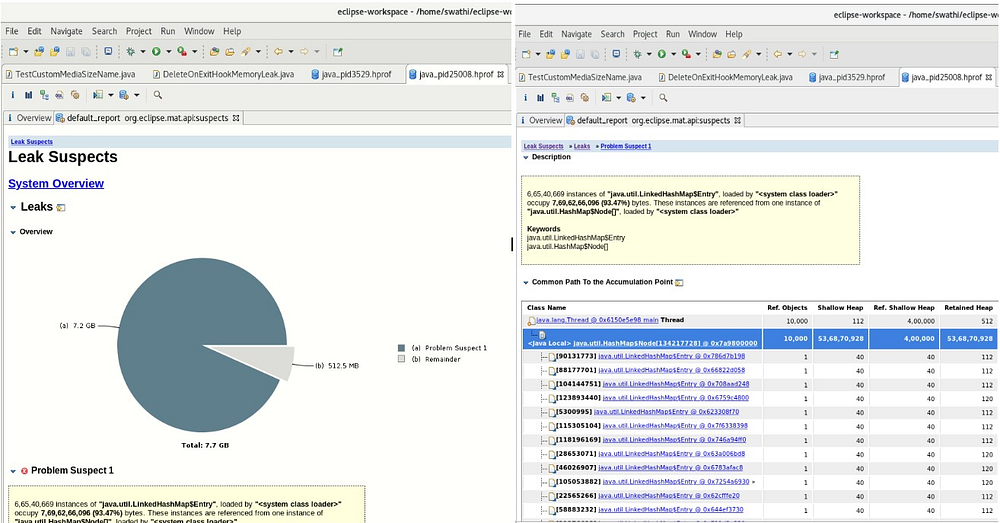
3. Dominators Tree: The Dominators Tree in MAT helps visualize the object graph and identify the root cause of memory retention. It shows which objects are dominating the heap and preventing garbage collection.
4. Histogram and Query Browser: MAT offers features to explore the heap dump through histograms and query browsers. These tools allow you to search for specific objects, analyze their references, and understand their impact on memory usage.
Conclusion
Troubleshooting memory leaks and OutOfMemoryErrors in Java applications is crucial for maintaining application performance and stability. By understanding the underlying causes and leveraging appropriate debugging tools and techniques, developers can effectively identify and resolve these issues, ensuring optimal application performance.
With tools like Memory Analyzer Tool (MAT), developers have powerful resources at their disposal to analyze heap dumps, identify memory leaks, and optimize memory usage. By incorporating these practices into their development workflow, developers can build more reliable and efficient Java applications.
We will continue blogging about generating GC logs, histograms, and analyzing them for heap memory issues in the next series